Author Archives: vidyut

WordPress: Problem happened with plugin upgrade – can’t delete old files

When you get an error like this while updating, check file ownership. Chances are that you edited something in the backend and the plugin or theme files now being owned by another user, cannot be deleted by the server.

If you have terminal access as root, type:

chown -R www-data:www-data /path/to/wordpress/*

Where www-data is the user your Apache runs as and /path/to/wordpress is of course the path to the root of your wordpress installation. the “*” is to apply to all files and folders and the “-R” earlier means the command [chown – for change owner – in this case] applies recursively to all files and folders contained in the folder named.

If you try to upgrade now, it should work.

Varnish won’t start – Too many arguments (…)

So you set up Varnish. You really did everything right, but when you try to start it…

root@www:/etc/apache2/sites-available# service varnish start
* Starting HTTP accelerator varnishd [fail]
SMA.s0: max size 512 MB.
Too many arguments (...)
usage: varnishd [options] -a …

and so on, and you have tried and tried to edit /etc/default/varnish till you’re ready to give up?

Varnish works fine if you start it from the command line with configuration (as described in the documentation – for testing), but fails to start as a daemon?

The problem is some invalid characters related with line break in the /etc/default/varnish file. They seem to be there in the original file itself. I was not able to fix the characters, but simply editing the file so that the whole configuration appears as one line works.

So, for example:

DAEMON_OPTS="-a :80
-T localhost:1234
-f /etc/varnish/default.vcl
-s malloc,256m"

Becomes

DAEMON_OPTS="-a :80 -T localhost:1234 -f /etc/varnish/default.vcl -s malloc,256m"

This worked for me. If you don’t like this you could try fixing whatever the issue is with the linebreak. Do tell me if you figure it out.

OpenVZ and UFW

So I found another problem area with the OpenVZ host and the Ubuntu Server. A good firewall is important for the safety of a server, but I, at least feel overwhelmed at the complexity and risk of messing things up very badly to directly touch iptables, and I have only done on rare occasions, and always worried.

UFW is a great and simple firewall application. Unfortunately if your server is on OpenVZ, you will not be able to use it out of the box because of the limited support for iptables. Here is a superb workaround in order to be able to use UFW on a Ubuntu host on OpenVZ. The instructions work well.

Will take you a while to do it all, but works like a charm, and the code is copy paste.

If, at the end of it, your installation of dependencies fails, and any further attempts to access repositories don’t work, DON’T PANIC. Simply disable and enable UFW and all should be well.

ERROR 2002 (HY000): Can’t connect to local MySQL server through socket ‘/var/run/mysqld/mysqld.sock’

So you ran an upgrade, or got carried away tweaking things on your server, and now MySQL is acting like an island of its own. Your websites can’t connect, your phpmyadmin can’t connect, and you are miserable.

You get errors like

ERROR 2002 (HY000): Can't connect to local MySQL server through socket '/tmp/mysqld.sock'

and, you being a n00b like me, are at your wits end.

I may have a quick fix as long as the error is 2002 and it is complaining about a socket.

Go to your MySQL configuration file [which on Ubuntu is /etc/mysql/my.cnf ]

There, copy the socket mysqld is using. It will be something like

[mysqld] 
datadir=/usr/local/mysql/data
socket=/var/lib/mysql/mysql.sock

Copy the line that says socket=/whatever/address/to/the/file.sock

See if there is a block for [client] that mentions socket. If there isn’t, make one below the block for [mysqld] and paste your socket line. If there is, fix the location to match.

Try now. No restart or anything needed. If it will work, it will work right away. If you have done good things in your life and deserve a break, this should put you out of your misery. 😀 It is among the likeliest culprits if new files and upgrades and such have happened.

If this doesn’t happen, then I would investigate to see if that location exists, has right permissions and such things…. or someone mentioned other checking for other configurations that may be messing with this – which I can’t even imagine where to begin.

Good Luck!

Problems upgrading your Ubuntu Server to 12.04 Ubuntu Precise Pangolin?

If you are running a Ubuntu server on a VPS, the latest upgrade may have brought dismay with warnings and errors and finally failure. Some of the sample output can look like:

Processing triggers for man-db …
locale: /lib/x86_64-linux-gnu/libc.so.6: version `GLIBC_2.15′ not found (required by locale)
locale: /lib/x86_64-linux-gnu/libc.so.6: version `GLIBC_2.14′ not found (required by locale)

A fatal error occurred

Please report this as a bug and include the files
/var/log/dist-upgrade/main.log and /var/log/dist-upgrade/apt.log in
your report. The upgrade has aborted.
Your original sources.list was saved in
/etc/apt/sources.list.distUpgrade.

SystemError: E:Sub-process /usr/bin/dpkg returned an error code (1)
ERROR:root:SystemError from cache.commit(): installArchives() failed

Could not install the upgrades

The upgrade has aborted. Your system could be in an unusable state. A
recovery will run now (dpkg –configure -a).

Please report this bug in a browser at
http://bugs.launchpad.net/ubuntu/+source/update-manager/+filebug and
attach the files in /var/log/dist-upgrade/ to the bug report.
installArchives() failed

Setting up libsnmp-base (5.4.3~dfsg-2.4ubuntu1.1) …
dpkg: dependency problems prevent configuration of libnih-dbus1:
libnih-dbus1 depends on libnih1 (= 1.0.3-4ubuntu9); however:
Version of libnih1 on system is 1.0.3-4ubuntu2.
dpkg: error processing libnih-dbus1 (–configure):
dependency problems – leaving unconfigured
Errors were encountered while processing:
libnih-dbus1

Upgrade complete

The upgrade has completed but there were errors during the upgrade
process.

dpkg: error processing libnih-dbus1 (–configure):

dependency problems – leaving unconfigured
Errors were encountered while processing:
libdbus-1-3
libc6-dev
libdrm2
libc-dev-bin
zlib1g-dev
libnih-dbus1

and so on.

The main reason for this is that your host is running a kernel that is no longer supported, so the upgrade kind of… refuses. To be sure that this is the problem, run:

uname -r

if you get 2.6.18 then this post is likely to help you. The problem apparently occurs because “your host is almost certainly running OpenVZ on a 2.6.18 kernel (all OpenVZ containers share the host kernel)” according to Ishaan Dalal. “The problem is that the libc 2.15 included with Precise requires a minimum 2.6.24 kernel to function.” He is maintaining a repository with a workaround for this.

To use the repository, add it to your sources the easy way like this:

apt-add-repository ppa:izx/ovz-libc

Chances are that this may not work for the same reason the upgrade didn’t – because stuff is broken, in which case, you add the following lines to /etc/apt/sources.list

deb http://ppa.launchpad.net/izx/ovz-libc/ubuntu precise main
deb-src http://ppa.launchpad.net/izx/ovz-libc/ubuntu precise main

And run:

sudo apt-key adv –keyserver keyserver.ubuntu.com –recv-keys BFAB4BD9

After which if you run

apt-get update

apt-get install -f

apt-get dist-upgrade

you are likely to go smoothly into the upgrade. Follow prompts, etc. Reboot when done, and you should be fine.

…. or at least I was.

Configuring Privoxy to use TOR

In these days of censorship concerns, increasing numbers of people are using TOR as a proxy and thus, increasing numbers of people are configuring their browsers wrong and going to the TOR check page only to realize that for all their proxy configurations, they either cannot see the page at all, or they see the result that they are not using TOR.

You set your HTTP Proxy to 8118, Socks5 Proxy to 9050 and imagined that it would work, but it doesn’t. Here’s what could be going wrong.

The proxy server is refusing connections

or

Firefox is configured to use a proxy server that is refusing connections.

This means that while you installed TOR, you did not install Privoxy. The port 8118 points to the Privoxy proxy. If you haven’t installed it, there is nothing to receive the connections. On Ubuntu, go

sudo apt-get install privoxy

On Windows… go to http://privoxy.org to download a suitable release. Install.

Which brings you to the next problem.

Sorry. You are not using TOR

You have checked everything. TOR is running. The onion is green. You have installed privoxy. It is running. Your proxy setting is 8118. You are able to access sites. BUT YOU ARE NOT USING TOR.

This is because privoxy is a proxy that:

Privoxy is a non-caching web proxy with advanced filtering capabilities for enhancing privacy, modifying web page data and HTTP headers, controlling access, and removing ads and other obnoxious Internet junk.

It does NOT use TOR unless you tell it to. You can do this by manually editing the configuration file, which on Ubuntu is located at /etc/privoxy/config (will update with the windows location soon, but should be easily found in the program files for privoxy.

Open it as root. Do a ‘find text’ for “localhost:9050”. The line will say:

# forward-socks5 / localhost:9050 .

Uncomment it by deleting the “#” in the beginning. Save and close file.

Now point your browser to http://check.torproject.org

You should see a bold green heading:

Congratulations. Your browser is configured to use TOR.

Done.

Note: If you do not see this text, please troubleshoot further. Without this text, your browsing is NOT anonymous.

Posting using Twitter api without permission

There is this service called Tweet cloud, which analyses your tweets for keywords and creates a cloud with the most highly used ones. Pretty. interesting too. However, I find that when it posts a link to your cloud, it also posts an image of the cloud using twitpic. How does it login to twitpic to post on my behalf?

Here’s the process.

When you login to the website, you reach this basic page, where it tells you about the service. Clicking Generate a cloud prompts you to grant access with your Twitter account.

Nice cloud. Loved it. You have the option to tweet your result or not. I chose to tweet. This is the tweet that got sent.

As you see from the short url, the pic is hosted at twitpic.com. I don’t remember logging in to twicpic. I didn’t authorize a login for twitpic. But the image got posted from my account. How did this happen?

I checked, but I was not logged in to Twitpic. Thus:

So I suppose the question now is if Twitter authorizations can be used by third parties to post in my name. Sure, this time, nothing offensive as such was done, but the point that it is possible to do it – is it a security issue? You decide.

WordPress Database Error: You have an error in your SQL syntax

When I used a slideshow plugin on AamJanata, I got this error.

WordPress database error: [You have an error in your SQL syntax; check the manual that corresponds to your MySQL server version for the right syntax to use near 'orderorder` INT(11) NOT NULL DEFAULT '0'' at line 1]
ALTER TABLE wp_gallery_slides CHANGE COLUMN order order INT(11) NOT NULL DEFAULT '0'`

Lot of investigation and frustration later led me to realize that if something is working for everyone and not for you, it is useful to look at your unique set up rather than the code.

Snooping in my databases showed me that the Character set used for the table for that plugin was not utf8, – actually different ones for two different plugins both giving me errors. Setting it right fixed the problem.

What to do?
Go to your database in PhpMyAdmin. Run your eyes down the encoding column and see which tables if any have encoding other than what the rest of the database is using. Chances are high that that will be the one giving you trouble. Go to the Operations tab for that table, set the encoding to what the rest of the database is using.

Done.

Permission denied: make_sock: could not bind to address 0.0.0.0:80

Did you just type

service apache2 restart

or

/etc/init.d/apache2 restart

and get stuff like:

* Starting web server apache2 ulimit: 88: error setting limit (Operation not permitted)
(13)Permission denied: make_sock: could not bind to address 0.0.0.0:80
no listening sockets available, shutting down
Unable to open logs
Action 'start' failed.
The Apache error log may have more information.

It is unlikely to be a big crisis. Looks like you don’t have permissions. Apache needs to be started by root user. Are you root? Try

sudo service apache2 restart

You’re welcome :p

The Kloutocalypse

Klout recently did an upgrade of their algorithm or crystal ball or whatever it is that they use. I lost about 15 points or so. as a result. My Klout score was 80 and it came down to 65.

Curious, I looked around to see what exactly was happening. Outrage abounded, and I investigated further. The scores had not only revised, but revised like they had always been that way. In other words, there is absolutely no indication that my score *ever* was 80. That got me pissed. I can understand reconfiguring an algorithm, but what does it mean that existing scores were changed too, AFTER that day had passed? What was it that I was seeing on my page all these days then?

I am lucky in the sense that I was not dependent on Klout for anything other than entertainment. Others who earn money based on their social networking skills were devastated. Some ran accounts for business houses and had no way of explaining why the score (which was seen as a measure of performance) had dropped. Worse, it had dropped so that it looked like the poor guys had been faking performance all along.

I am more interested in how things work than what my score is, and proceeded to observe what happens to this new score of 65 that I had as a result of my tweeting habits.

Now here is the strange part. I have been adding an average of 30-40 followers a day. In the last few days, I have been one of the core people driving Justice for Keenan and Reuben making it unforgettable so that the perpetrators who had corrupt backing may not escape justice. It could be argued that my trying may not have been effective, but that is solidly refuted by loads of mentions, RTs, comments and several posts I wrote highlighting crucial aspects of happenings getting thousands of hits. The effort (of which I was only one and increasingly minor part as numbers swelled) was successful in getting National media to focus on it solidly – that is how much influence it had.

The site was idling happily with less than a thousand visits a day.

Notice the last few days after I started to blog about Justice for Keenan and Reuben and see the massive spike in traffic. This spike blew the limits of my makeshift CDN, came very close to bringing the server down in spite of varnish being installed and every kind of caching applied. Mostly driven by social networking – search engines kicked in later.

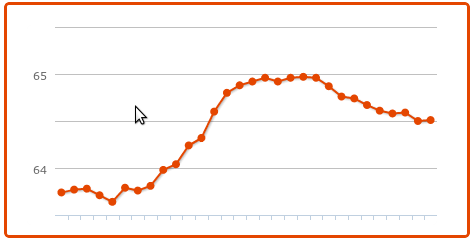
Now, for the same days, look at the Klout graph.

The data is from the website where some key posts were. However, there were hundreds of tweets getting replies, RTs, more. Similar things happened with my Facebook account, for similar reasons.

Don’t believe me, check the number of shares alone shown below this post – for example. And of course there were thousands of mentions and RTs other than ones with links. I am missing reading all mentions at times when they come in too fast and I am offline.

And… My Klout dropped all through. This is beyond bizarre, illogical. Let me get this right. Increasing followers, mentions, RTs, comments people acting on my tweets… doesn’t increase influence?

Which brings me to the goodbye point, because if I wanted to know someone’s Klout, this is the information I’d want to know – how effective they were. If that doesn’t reflect in the score, I see no utility for it. It isn’t about my score.

I couldn’t care less if I didn’t tweet for a week and it dropped to zero. I do absolutely nothing that depends on it and my ego has plenty other things to keep it high if I lose this one. So as far as I am aware, this is not sour grapes at my end at least. My PeerIndex score for that matter is a humble 55 and I can live with it with no problems. However, with Klout, the problem has become knowing the truth from the lies, and from understanding what is the measure being conveyed by the number at all and does their meaning of influence match what I understand as influence and want to know. Tomorrow it could be another number equally inexplicably and today’s score another number from what it actually is. What rubbish is this?

Several others have pointed out various problems ranging from privacy issues to profiting from user owned content without permission or at least permission that people gave. Serious ones like lack of solutions to make data private or  delete Klout profiles completely. To me it is really simple. I don’t want to trust, because I can’t understand it anymore.

Not needing Klout to make a living, and having lost any sense of discovery to make it entertaining, this service joins the thousands like it that came and went. Klout is no more (for me at least)

We shall mourn its sad demise.