Monthly Archives: February 2012

Posting using Twitter api without permission

There is this service called Tweet cloud, which analyses your tweets for keywords and creates a cloud with the most highly used ones. Pretty. interesting too. However, I find that when it posts a link to your cloud, it also posts an image of the cloud using twitpic. How does it login to twitpic to post on my behalf?

Here’s the process.

When you login to the website, you reach this basic page, where it tells you about the service. Clicking Generate a cloud prompts you to grant access with your Twitter account.

Nice cloud. Loved it. You have the option to tweet your result or not. I chose to tweet. This is the tweet that got sent.

As you see from the short url, the pic is hosted at twitpic.com. I don’t remember logging in to twicpic. I didn’t authorize a login for twitpic. But the image got posted from my account. How did this happen?

I checked, but I was not logged in to Twitpic. Thus:

So I suppose the question now is if Twitter authorizations can be used by third parties to post in my name. Sure, this time, nothing offensive as such was done, but the point that it is possible to do it – is it a security issue? You decide.

WordPress Database Error: You have an error in your SQL syntax

When I used a slideshow plugin on AamJanata, I got this error.

WordPress database error: [You have an error in your SQL syntax; check the manual that corresponds to your MySQL server version for the right syntax to use near 'orderorder` INT(11) NOT NULL DEFAULT '0'' at line 1]
ALTER TABLE wp_gallery_slides CHANGE COLUMN order order INT(11) NOT NULL DEFAULT '0'`

Lot of investigation and frustration later led me to realize that if something is working for everyone and not for you, it is useful to look at your unique set up rather than the code.

Snooping in my databases showed me that the Character set used for the table for that plugin was not utf8, – actually different ones for two different plugins both giving me errors. Setting it right fixed the problem.

What to do?
Go to your database in PhpMyAdmin. Run your eyes down the encoding column and see which tables if any have encoding other than what the rest of the database is using. Chances are high that that will be the one giving you trouble. Go to the Operations tab for that table, set the encoding to what the rest of the database is using.

Done.

Permission denied: make_sock: could not bind to address 0.0.0.0:80

Did you just type

service apache2 restart

or

/etc/init.d/apache2 restart

and get stuff like:

* Starting web server apache2 ulimit: 88: error setting limit (Operation not permitted)
(13)Permission denied: make_sock: could not bind to address 0.0.0.0:80
no listening sockets available, shutting down
Unable to open logs
Action 'start' failed.
The Apache error log may have more information.

It is unlikely to be a big crisis. Looks like you don’t have permissions. Apache needs to be started by root user. Are you root? Try

sudo service apache2 restart

You’re welcome :p

The Kloutocalypse

Klout recently did an upgrade of their algorithm or crystal ball or whatever it is that they use. I lost about 15 points or so. as a result. My Klout score was 80 and it came down to 65.

Curious, I looked around to see what exactly was happening. Outrage abounded, and I investigated further. The scores had not only revised, but revised like they had always been that way. In other words, there is absolutely no indication that my score *ever* was 80. That got me pissed. I can understand reconfiguring an algorithm, but what does it mean that existing scores were changed too, AFTER that day had passed? What was it that I was seeing on my page all these days then?

I am lucky in the sense that I was not dependent on Klout for anything other than entertainment. Others who earn money based on their social networking skills were devastated. Some ran accounts for business houses and had no way of explaining why the score (which was seen as a measure of performance) had dropped. Worse, it had dropped so that it looked like the poor guys had been faking performance all along.

I am more interested in how things work than what my score is, and proceeded to observe what happens to this new score of 65 that I had as a result of my tweeting habits.

Now here is the strange part. I have been adding an average of 30-40 followers a day. In the last few days, I have been one of the core people driving Justice for Keenan and Reuben making it unforgettable so that the perpetrators who had corrupt backing may not escape justice. It could be argued that my trying may not have been effective, but that is solidly refuted by loads of mentions, RTs, comments and several posts I wrote highlighting crucial aspects of happenings getting thousands of hits. The effort (of which I was only one and increasingly minor part as numbers swelled) was successful in getting National media to focus on it solidly – that is how much influence it had.

The site was idling happily with less than a thousand visits a day.

Notice the last few days after I started to blog about Justice for Keenan and Reuben and see the massive spike in traffic. This spike blew the limits of my makeshift CDN, came very close to bringing the server down in spite of varnish being installed and every kind of caching applied. Mostly driven by social networking – search engines kicked in later.

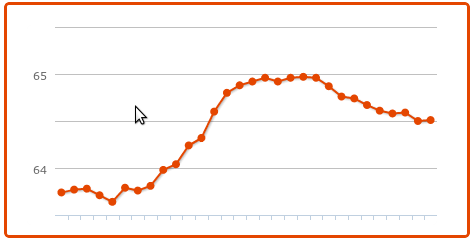
Now, for the same days, look at the Klout graph.

The data is from the website where some key posts were. However, there were hundreds of tweets getting replies, RTs, more. Similar things happened with my Facebook account, for similar reasons.

Don’t believe me, check the number of shares alone shown below this post – for example. And of course there were thousands of mentions and RTs other than ones with links. I am missing reading all mentions at times when they come in too fast and I am offline.

And… My Klout dropped all through. This is beyond bizarre, illogical. Let me get this right. Increasing followers, mentions, RTs, comments people acting on my tweets… doesn’t increase influence?

Which brings me to the goodbye point, because if I wanted to know someone’s Klout, this is the information I’d want to know – how effective they were. If that doesn’t reflect in the score, I see no utility for it. It isn’t about my score.

I couldn’t care less if I didn’t tweet for a week and it dropped to zero. I do absolutely nothing that depends on it and my ego has plenty other things to keep it high if I lose this one. So as far as I am aware, this is not sour grapes at my end at least. My PeerIndex score for that matter is a humble 55 and I can live with it with no problems. However, with Klout, the problem has become knowing the truth from the lies, and from understanding what is the measure being conveyed by the number at all and does their meaning of influence match what I understand as influence and want to know. Tomorrow it could be another number equally inexplicably and today’s score another number from what it actually is. What rubbish is this?

Several others have pointed out various problems ranging from privacy issues to profiting from user owned content without permission or at least permission that people gave. Serious ones like lack of solutions to make data private or  delete Klout profiles completely. To me it is really simple. I don’t want to trust, because I can’t understand it anymore.

Not needing Klout to make a living, and having lost any sense of discovery to make it entertaining, this service joins the thousands like it that came and went. Klout is no more (for me at least)

We shall mourn its sad demise.

Fraudulent method of earning from Twitter

So I read some article and decided to share it on Twitter. I used the button placed conveniently, and the popup box had several options to configure. It was distracting, and by the time I hit tweet, I realized that there was a checkbox pre-selected to enter me for an iPad giveaway.

Like so: Please note that this screenshot is from a link I opened from the spam trail on Twitter (to grab a screenshot), not the original article I tweeted. Which also means that this is the format of the box, not something the individual blogger had done.

Note the configurable options and lack of url that you will be tweeting.

If you see this, you can’t actually do anything with the link you are tweeting or see the shortened url that gets posted. All that you know is that whatever it is, the link will “eventually” reach the url mentioned. Compare with other url shorteners where your link gets added to the text box and you can write your tweet around it. I wonder why go through the extra effort to set it up like this, but never mind that.

See below? You see the checkbox selected to enter you for an iPad giveaway? unless you notice and uncheck that you supposedly get entered for an iPad giveaway, which would still not be the end of the world, EXCEPT…. your account automatically starts following this @shoemoney account AND sends out a tweet OTHER than the tweet you just shared, saying that you entered for an iPad giveaway and links to…

Read lower right column carefully. You can divert traffic.

If you read the bottom right column, it says that you can point your short links to variable sources.

Now, the thing is, you have your account advertizing for some dubious practice where you can get people to RT a very nice link, and when it goes viral, you switch it to something that earns you money?

I see three very serious violations here:

1. Tweeting from my account without permission.
2. Tweeting advertizements of dubious ethics from my account without permission, so it isn’t just about permission, it is about my reputation too! I have credibility among followers that gets shot if I have tweeted this to them, or if anyone has RTd a tweet that gets swapped for something shady.
3. Subscribing to someone’s account without me knowing.

Now, there is a link there that says see more great Twitter contests, which may possibly contain the info that entering the contest involves sending out the tweet and following the account or something, but it is definitely not clear on the popup for sending the tweet that your account will be doing things you have not authorized.

It seems like a minor thing, but it is fraudulent. For one, this @shoemoney account’s promotions will end up in your (and many other people’s) timeline to get clicks, etc.

For another, this account is able to charge more for any advertizing it does, because of the fraudulent follower count.

You may get links to dubious destinations, you may end up unwittingly promoting unethical practices – at the cost of your own credibility.

The mention of entering contest for iPad itself is not something you opted for, but something already selected, which seems harmless enough and possibly even not noticed by regular tweeters who see the button more as a quick facility than something to watch what they are signing.

In other words, this is a misuse of Twitter.

But is he really popular if sending a tweet adds followers without them knowing?

Now, this account has 143,676 followers. Very impressive, except… not.

It would be really impressive to have so many followers, and I’m sure some are legit, but when using a button to share a post on Twitter gets you subscribed to this account – unknowingly – then it is more of a measure of how many people got conned into this.

If anyone from Twitter is reading this, please take action against this account.

The rest of you, if what I said makes sense, mark this account for the spam it is.

Rewrite / Disk Cache-enhanced / Minify not working in W3 Total Cache : Idiotproof checklist

W3 Total Cache is hands down the best speed solution I have ever found for WordPress. However, it can be a little intimidating to configure, and sometimes gets you stuck. Being a self-learned admin, I am more often the idiot, so I go back to what works and figure it out. Here’s my bombproof checklist that has never failed

If you get something like this:

It appears Page Cache URL rewriting is not working. If using apache, verify that the server configuration allows .htaccess or if using nginx verify all configuration files are included in the configuration.

or

It appears Minify URL rewriting is not working. If using apache, verify that the server configuration allows .htaccess or if using nginx verify all configuration files are included in the configuration.

Most of the standard advice is not too useful. Then there are those who simply call it a W3TC bug and leave it at that. Maybe it was a bug earlier, but I guarantee you it is working right now and that you can make it work. *

[* = Minify in W3 Total Cache needs php5.5 to work. Most people seem to have php5.3 – then it won’t work and this guide can’t help you – you will have to upgrade php if it is that crucial for it to work.]

Of course you could turn off minify and disk-caching:enhanced in W3 Total Cache and the problem will be gone, but if you want to *make* it work, for the functionality or because you may be like me and something not working drives you nuts… read on.

  • Check installed modules: env, rewrite, mime, headers [if you can fix this, you might as well go ahead and make sure expires is active too for better caching]. On a debian/ubuntuinstall, you’d do
    a2enmod env

    for example.

    No rocket science needed here, but I’ve once scratched my head for an hour and tormented myself with checking htaccess files and permissions and what not on a new debian install only to realize mod_env was not active.

  • Check your .htaccess files. Yes. In the plural. The .htaccess in the root directory should contain W3 Total Cache rules *before* the WordPress rules. Then, there would be more .htaccess files depending on what you have enabled. For example, if you have disk enhanced caching enabled, you’d have an .htaccess to check in the pgcache folder inside w3tc folder inside your wp-content directory. Which brings me to…
  • Check the w3tc folder. I cannot stress this enough. If you want your page caching to work, your wp-content folder will have a folder called w3tc, which will contain a folder called pgcache [if you are using minify, there will be a folder called “min” too]. If it isn’t there, create it. If it is there, chmod its permissions to 777. It should contain an .htaccess file. If the file isn’t there, or you had to create the folder, go to your admin panel for W3 Total cache, click the tab for “Install” scroll down. You will have .htaccess rules applicable for your site listed there. Copy the correct ones – the file paths are written above the content. Can’t go wrong.
  • Go up to your wp-content directory and make sure to chmod your file/folder permissions to 777 – once you get page cache working, you could lower them to find the minimum required. First let’s get it working.
  • Check for crucial files. You can’t miss this. There will be a red alert on your admin panel if files are missing – usually complaining that your wp-content folder is not writeable or the files are missing. See named files, make sure they are there. If they aren’t, you could download a copy of the plugin to grab them easy.
  • I have never failed to get W3TC working with all this right. Yes, I am talking “disk:enhanced” page caching. But as a last shot, worth checking for file ownership, particularly if, like me you are in the habit of ssh-ing in as admin on the server to edit files. If you have entered the WordPress directory, it is worth setting the correct ownership when done to save yourself a lot of misery later.

Note: If you have renamed your .htaccess, you may want to copy back any customized rules that you may have put into it from the old file to the new file. Be ready to take them out if they cause things to crash again 😉

How can tweets be archived for proof

Suhel Seth being sued by ITC and subsequently deleting some tweets raises the question of how tweets can be used as proof after deletion. The old method of screenshots raises questions of tampering and linking to the tweet is no use once it is deleted.

Suhel Seth being sued by ITC and subsequently deleting some tweets raises the question of how tweets can be used as proof after deletion. The old method of screenshots raises questions of tampering and linking to the tweet is no use once it is deleted.

Suhel Seth being sued by ITC and subsequently deleting some tweets raises the question of how tweets can be used as proof after deletion. The old method of screenshots raises questions of tampering and linking to the tweet is no use once it is deleted.

Suhel Seth being sued by ITC and subsequently deleting some tweets raises the question of how tweets can be used as proof after deletion. The old method of screenshots raises questions of tampering and linking to the tweet is no use once it is deleted.

http://storify.com/vidyut/how-can-tweets-be-archived-for-proof

HTML Tidy on Ubuntu

Uh… this could have been a tweet instead of a post.

in your terminal, paste:

apt-get install php5-tidy

Answer “y” when asked. Done.

Just to make this last longer… if this doesn’t do the trick, you aren’t logged in as root. try:

sudo apt-get install php5-tidy

Restart Apache

service apache2 restart

Now, really, I’m done. Seriously.

Pagespeed + Apache2 on Ubuntu Server

I try and get all my installing done before I get into putting files on the server. So, if I wreck something and have to start over, I haven’t wasted a lot of upload and setting up time.

This server I am describing runs Ubuntu Server and I am using it to run a few wordpress sites. WordPress being a resource hog (charming as it is), I want to keep things peak. If it seems excessive, I can always drop the excessive later.

Google’s mod_pagespeed

I have not used this before, but I heard that it compresses images, and that’s good enough for me to give it a shot, rather than fiddle with smush.it plugins that can’t reach many images called the most. I can remember to compress all before uploading, but seriously, who remembers? mod_pagespeed is in beta, but I’m going on trust, seeing as how the project has active development.

So here goes. Pretty straightforward. Get debian package, install. went without a hiccup this one. Easily the least complicated so far.

wget https://dl-ssl.google.com/dl/linux/direct/mod-pagespeed-beta_current_amd64.deb
sudo dpkg -i mod-pagespeed*.deb

service apache2 restart

Now edit /etc/apache2/mods-available/pagespeed.conf and add your cdn (if any) so that pagespeed knows to optimize those files too.

service apache2 restart

Update: I disabled pagespeed after my CPU usage started spiking rapidly and dangerously. I suppose it can be configured better, So I will come back to it at a later date. Too busy to do any extensive tinkering and babying right now.

Update: I have been able to get this to work most excellently – even for my efficeincy obsessed mind – post coming up with my settings and logic soon.

Configuring Varnish Cache for WordPress

Oh, so you installed Varnish, what good will it do, if most of your content is not cached? I went for the “Preparing Varnish/Wordpress? for a Slashdotting in 60 seconds or less… ” code provided on the Varnish site. Its rather ruthless, but I’m not particularly attached to seeing the logged in version of my websites that I want Varnished anyway. Few log in to them. Ruthless works for me. So here’s how to do it. Please note that there is a change of code since that sample was provided, which I have corrected below. Feel free to plug and play.

Edit your /etc/default/varnish file and edit the port and cache size in.

DAEMON_OPTS=”-a :80 
-T localhost:6082 
-f /etc/varnish/default.vcl 
-S /etc/varnish/secret 
-s file,/var/lib/varnish/$INSTANCE/varnish_storage.bin,1gb”

Port is at 6081, which you change to 80. Set the storage size as per your needs. Don’t obsess over it. You can always edit if needed later.

Then, in /etc/varnish/default.vcl paste the following code.

backend default {    .host = "localhost";    .port = "8080";    .max_connections = 30;    .connect_timeout = 4.0s;    .first_byte_timeout = 600s;    .between_bytes_timeout = 600s;
}

# Drop any cookies sent to WordPress.        sub vcl_recv {                if (!(req.url ~ "homeschoolingindia.in|phpmyadmin|wp-(login|admin)")) {                        unset req.http.cookie;                }        }
# Drop any cookies WordPress tries to send back to the client.        sub vcl_fetch {                if (!(req.url ~ "phpmyadmin|wp-(login|admin)")) {                        unset beresp.http.set-cookie;                }        }

You don’t have to configure everything. What you don’t configure falls back on pretty decent defaults. What is being done here is that all cookies are dropped so that the page becomes cachable, unless you are accessing login or admin, where you need cookies to be able to access. I had some trouble with interaction on the front page. No admin option was available, since this was the production version I was seeing. Making comments was a problem.

The solution was rather simple. I installed the Discus plugin to handle comments. It formats them rather nicely, magages efficiently, integrates reasonably well with wordpress, adds features like likes and shares along with the oh so fabulous lists of mentions. However, the bestest part is that it is delivered through javascript, so it is totally functioning when the page is cached.

Other problems likely may be using any analytics software from the server end. Since most requests will not reach the server at all, there is no way for the server to record hits and so on. Again, javascript to the rescue. What do I say. In my opinion, google analytics works best for my needs anyway.

So, you understand the theme of the matter, basically, you are not going to be pulling any customized pages. Javascript being rendered in the browser, couldn’t care less if it were served from a html page or php. Your adsense will work, so will analytics. Some “link selling” plugins that rely on php may not register as active with your providers, but then you shouldn’t be selling I’ll not comment on the ethics of that…. This site, AamJanataWide Aware and Nisarga run like that.

However, this brings us to the site that won’t work. A site that users login and use. You got that right. BuddyPress. Homeschoolingindia.in is not getting the varnish treatment. I guess you could do it so that you use varnish with non logged in users, if you have a lot of non-member visitors. I found it simpler to leave it out.

Two possibilities. The first is to exclude it through varnish. Either by passing requests through for target domain or configuring Varnish per domain, and not for this one. Please to also remember to exclude it in the cookie killing settings. Many possibilities depending on what you want.

The second option is what I did, because it was simple and I had an extra IP from my provider. Configure all sites to be cached to answer on one IP on your backend port 8080 in this example and those not to be cached to answer on port 80 (the regular port) on the second IP. In the default.vcl, in the backend configuration, replace localhost with the IP address serving sites to be cached on port 8080. Done. Your buddypress is now happily guzzling scandalous amounts of resources, while your other wordpresses are playing static html. ;)

There is more, much more, but I find that this is adequate for basic configuration. Later, as you get used to the cache, you will be able to analyze what is happening, and filter in more and more hits to the cache and reduce server load further, but that is another how to in itself, if at all I have the competency to write it.

This should keep your server from crashing under whatever it is that guzzles up memory.

Please note that these are my learnings as I struggle to find out things. I am not a professional. Only a  person who wanted to build a website. I am cutting through the massive finding out missions I had to take and providing the results of that learning. No guarantees, though whatever I say here is working according to my server.

If you would like something more tweakable (and complicated), with load balancing and multiple servers for one site, etc. Try here

Note: This post is old. Soon, there is one more coming up with more nuanced settings, and alternative vcls.